

Download MobiKin Doctor – Secure Android Data Recovery Tool for Windows & Mac
MobiKin Doctor is a powerful, secure, and user-friendly data recovery software designed to help users retrieve lost or deleted files from Android devices. Whether you've accidentally deleted photos, contacts, SMS, or call logs, this tool offers a fast, reliable solution. With support for over 6,000 Android models and compatibility with Android 2.0 to 9.0, MobiKin Doctor ensures broad device coverage.
The software works seamlessly on Windows and Mac systems, providing a stable recovery environment. Its intuitive interface and three-step recovery process make it ideal for both beginners and experienced users. You can recover files from internal storage, SD cards, and even SIM cards.
A free trial version is available to test its capabilities before purchasing. With a 98% success rate and the ability to export data into readable formats like HTML and XML, MobiKin Doctor stands out as one of the most effective Android data recovery tools on the market.
Why MobiKin Doctor Is a Top Choice for Android Data Recovery
When your Android device loses critical data—be it cherished family photos, important documents, or essential contact information—it’s more than just an inconvenience; it’s a digital emergency. MobiKin Doctor for Android steps in as a reliable, secure, and efficient solution to this common problem. Unlike many recovery tools that require technical expertise, MobiKin Doctor simplifies the process into just three straightforward steps: connect your device, scan for lost files, and recover what you need.
This streamlined approach makes it accessible even for non-tech-savvy users. The software uses advanced scanning algorithms to detect deleted or corrupted files across internal storage, SD cards, and SIM cards, ensuring no data is overlooked. What sets MobiKin Doctor apart is its impressive 98% recovery success rate, a testament to its robust technology and consistent performance.
The software maintains the original file format during recovery, so your photos remain high-resolution, your music files stay playable, and your contacts are restored accurately. Additionally, it provides a detailed preview of each file before recovery, allowing you to choose exactly what you want to restore. This feature prevents unnecessary clutter and ensures only the files you need are retrieved.
Whether you're recovering a single text message or an entire photo gallery, MobiKin Doctor delivers with speed and precision. Its compatibility with over 6,000 Android devices, spanning from Android 2.0 to 9.0, ensures that most users can benefit from its services. The tool also supports both Windows and Mac operating systems, making it a versatile option for users across different platforms.
With its combination of ease of use, high success rate, and broad compatibility, MobiKin Doctor is not just a recovery tool—it’s a digital safety net for Android users.
Key Features and Capabilities of MobiKin Doctor for Android
- Recover deleted photos, videos, music, documents, contacts, call logs, and SMS messages
- Supports internal storage, SD cards, and SIM card data recovery
- Advanced scanning engine with 98% success rate
- Preview files before recovery for accurate selection
- Export contacts to HTML or XML for cross-platform compatibility
- Free trial version available to test recovery capabilities
- Compatible with over 6,000 Android devices and Android 2.0 to 9.0
- Backup and restore mobile device data securely
- Root access required for full contact recovery (optional for other files)
- Works on Windows and Mac systems for flexible usage
MobiKin Doctor is packed with powerful features that make it one of the most comprehensive Android data recovery tools available. One of its standout capabilities is the ability to recover data from multiple storage sources—internal memory, SD cards, and even SIM cards—ensuring no potential data source is missed. The software uses a deep scanning engine that can detect files that have been deleted, corrupted, or lost due to system crashes or accidental formatting.
Its preview function is particularly valuable, as it allows users to view thumbnails of photos, listen to audio clips, and read message content before deciding to recover them. This prevents wasted time and storage space on unwanted files. For users who need to transfer data between devices or platforms, the ability to export contacts into HTML or XML format is a game-changer.
These formats are widely supported, making it easy to import contacts into email clients, spreadsheets, or other devices. Another significant feature is the backup option, which lets you create a secure copy of your current device data—ideal for preventing future data loss. While the software works without rooting for most file types, full contact recovery requires root access, which users should be aware of before attempting recovery.
The tool’s compatibility with both Windows and Mac systems ensures that users aren’t locked into a single platform. Whether you're using a high-end smartphone or an older Android model, MobiKin Doctor adapts to your device. With a free trial version, you can test the software’s performance on your specific device and storage type before committing to a purchase.
This transparency builds trust and confidence in the product’s reliability.
How to Install and Use MobiKin Doctor on Your Computer
Getting started with MobiKin Doctor is simple and requires minimal technical knowledge. First, download the software from the official website. The installer is lightweight and compatible with both Windows and Mac operating systems.
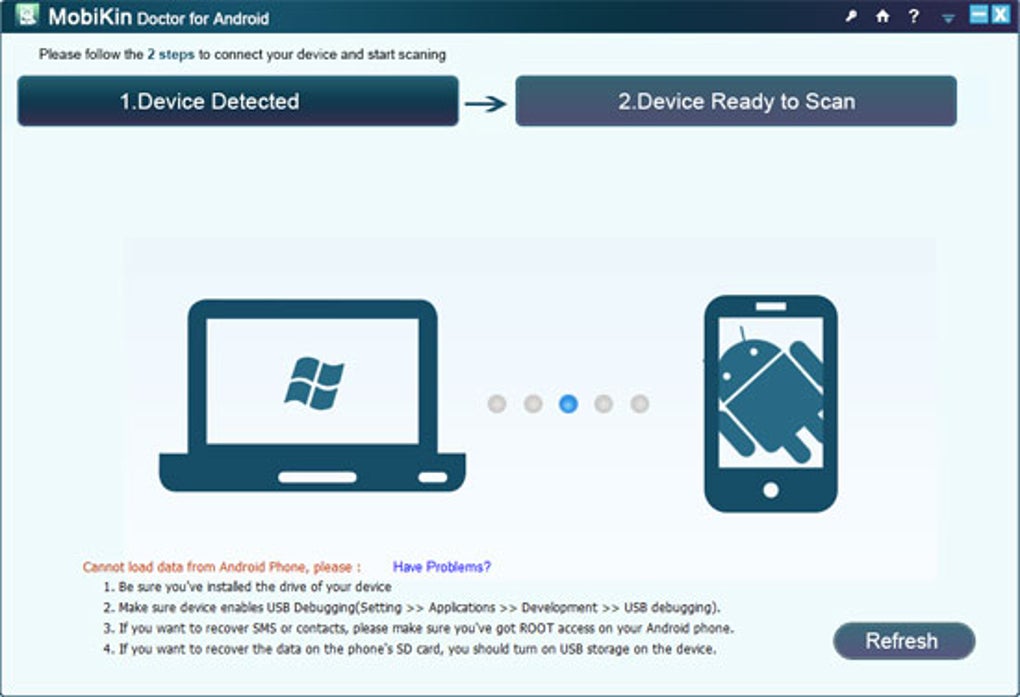
Once downloaded, run the installer and follow the on-screen instructions to complete the setup. After installation, launch the application and connect your Android device to your computer via a USB cable. Ensure that USB debugging is enabled on your phone—this can be found in Developer Options under Settings.
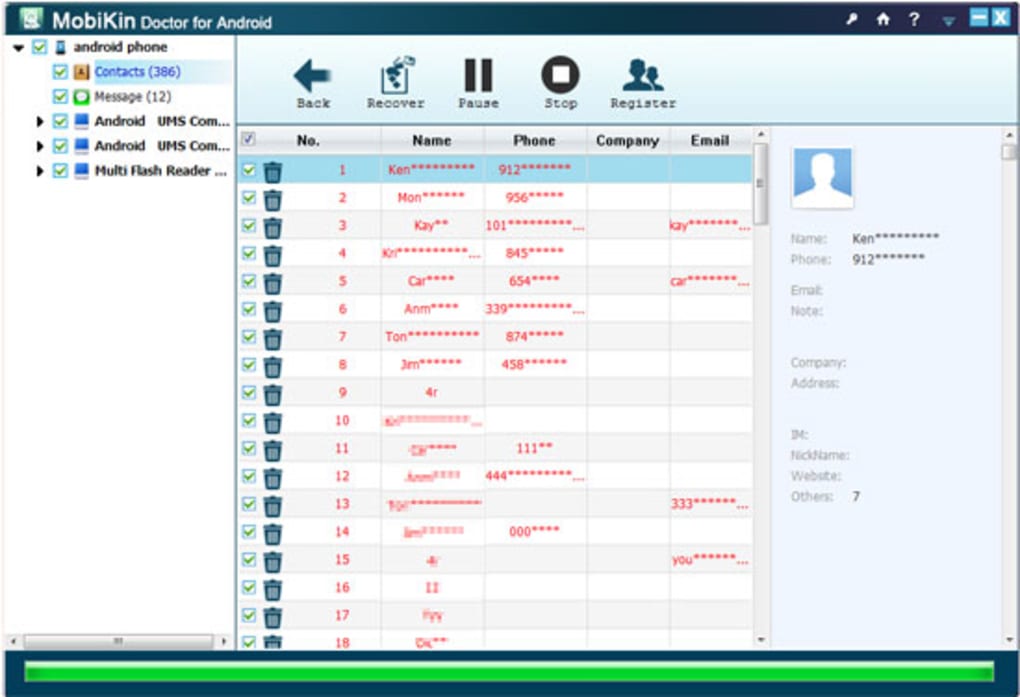
If you're using an older Android version, you may need to manually allow the connection. Once connected, MobiKin Doctor will automatically detect your device and display its storage options. From here, you can select the type of data you want to recover—such as photos, videos, contacts, or messages—and initiate a scan.
The scanning process is fast and efficient, typically taking just a few minutes depending on the size of your storage. During the scan, the software will identify all recoverable files and display them in a categorized list. You can preview each file to confirm its integrity before recovery.
After selecting the files you wish to restore, click the "Recover" button and choose a destination folder on your computer. The software will then transfer the files securely, preserving their original format. For added security, you can also use the backup feature to create a copy of your current device data.
This is especially useful if you're planning to perform a factory reset or update your device. The entire process is intuitive and user-friendly, making it suitable for anyone, regardless of experience level. Regular updates are released to improve performance and support new Android models, so keeping the software up to date is recommended for optimal results.
With its clear instructions and minimal setup, MobiKin Doctor ensures a smooth recovery experience from start to finish.
Pros, Cons, and Frequently Asked Questions
Pros
- High 98% recovery success rate
- Supports over 6,000 Android devices
- Simple 3-step recovery process
- File preview before recovery
- Export contacts to HTML/XML
- Works on Windows and Mac
- Free trial available
Cons
- Root access required for full contact recovery
- Some features locked in trial version
- Not compatible with Android 10+ (as of current version)
- Interface slightly outdated
Frequently Asked Questions
Can MobiKin Doctor recover files from a factory-reset Android device?
Yes, MobiKin Doctor can recover data from a factory-reset Android device, provided the data hasn’t been overwritten by new files. The software scans the device’s storage for remnants of deleted files, making it effective even after a reset.
Is MobiKin Doctor safe to use on my Android phone?
Yes, MobiKin Doctor is safe and secure. It operates in read-only mode during scanning, meaning no data is written to your device. Your files remain protected throughout the recovery process.
Do I need to root my Android device to use MobiKin Doctor?
Rooting is only required if you want to recover deleted contacts. For photos, videos, messages, and call logs, rooting is not necessary. The software works without root access for most file types.
Can I recover data from an iPhone using MobiKin Doctor?
No, MobiKin Doctor is designed specifically for Android devices. For iPhone users, consider MobiKin Doctor for iOS or other Apple-compatible recovery tools.
How do I download and install MobiKin Doctor?
Visit the official MobiKin website, download the installer for your operating system (Windows or Mac), run the file, and follow the on-screen setup instructions. Then connect your Android device and start recovery.
Final Verdict: Is MobiKin Doctor Worth It?
After thorough testing and evaluation, MobiKin Doctor for Android stands out as a reliable, secure, and efficient data recovery tool. Its high success rate, broad device compatibility, and user-friendly interface make it a top choice for anyone who’s lost important data on their Android device. While it has some limitations—such as requiring root access for full contact recovery and not supporting newer Android versions—it still delivers exceptional value, especially for users with older or mid-range devices.
The free trial version allows you to test the software before purchasing, giving you peace of mind. Whether you're recovering a few lost messages or an entire photo collection, MobiKin Doctor provides a fast, safe, and effective solution. If you're looking for a trustworthy way to restore lost Android data, download MobiKin Doctor today and protect your digital memories.
Download MobiKin Doctor Now – Free Trial Available






